Moving From HyperCrux 0.x to the Beta Takes an Export for the Data and a New Import Path for Go
HyperCrux 0.x, the releases 0.1 and 0.2, keeps a database in one SQLite file. The Beta is the new engine in Go that an AI coding agent has built since 7 October 2026, with no SQLite underneath, and it keeps 0.x’s Go API and 0.x’s command. It hasn’t been released yet, and it builds from the repository on GitHub. The progress report of 14 October says what the Beta is and how fast it runs.
For a program that sticks to 0.x’s Go API and to the part of SQL the Beta takes, moving over is short work. The data goes across in one export, and the Go code changes its import path. This post goes through those two steps, then through what else differs, with what to do about each. The full list, every difference with its fix, is MOVING.md in the repository.
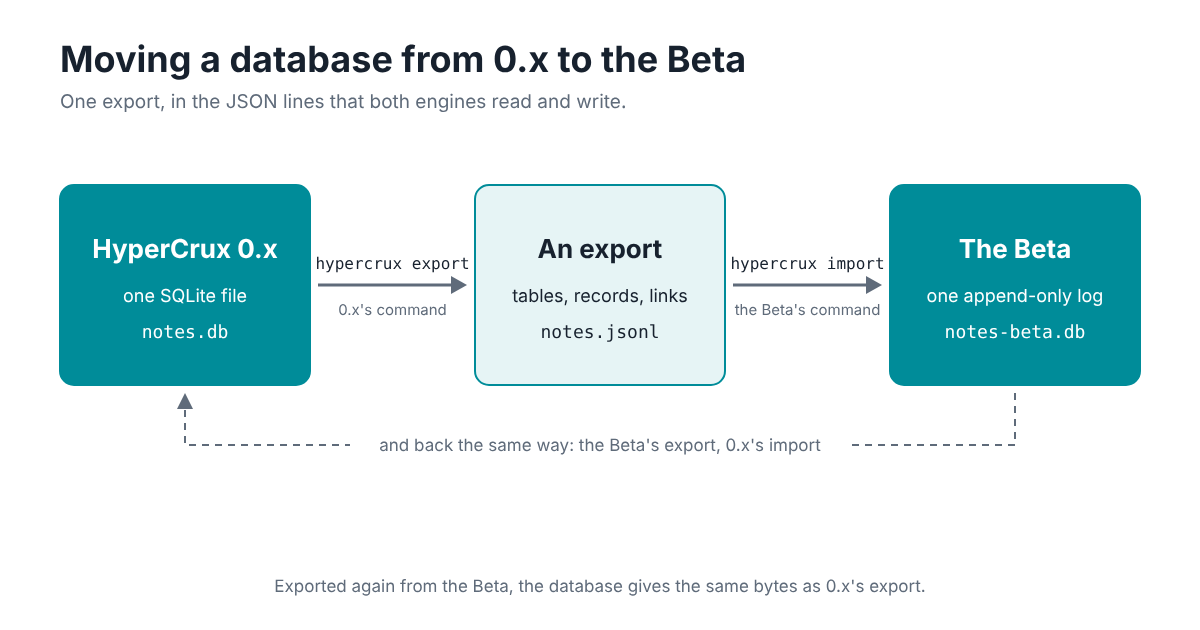
Moving a Database Across
The two engines share one export format: JSON lines, a table, a record or a link on each line, with numbers written so they read back to the same bits. 0.x’s hypercrux export writes it, and the Beta’s hypercrux import reads it. 0.1 has no export, so use 0.2, which opens 0.1’s files as they are.
To try it without touching real data, make a small database with 0.x’s command:
hypercrux put notes.db customer:42 '{"name": "Dana"}'
hypercrux put notes.db docs:1 '{"title": "Q3 plan", "status": "open", "vec": [0.9, 0.1, 0]}'
hypercrux put notes.db docs:2 '{"title": "Hiring notes", "status": "done", "vec": [0.1, 0.9, 0.1]}'
hypercrux link notes.db customer:42 owns docs:1
hypercrux link notes.db customer:42 owns docs:2
Then check it and export it, still with 0.x’s command. Export refuses a database that check finds problems in, so the check shows first whatever there is to fix:
hypercrux check notes.db
hypercrux export notes.db > notes.jsonl
Build the Beta’s command from a clone of the repository, as its README shows, and import the export into a new file:
hypercrux import notes-beta.db < notes.jsonl
imported 2 tables, 3 records, 2 links, 2 vectors into notes-beta.db
An import is one transaction, so a database goes in whole or not at all. Tables keep their fields in order and their vector sizes, so the Beta’s export of the new file matches 0.x’s export of the old one, byte for byte:
hypercrux export notes-beta.db > back.jsonl
cmp notes.jsonl back.jsonl
In Go, Export and Import on a DB do the same as the two commands.
What Stays Behind
An export carries record tables, their records and their links. A few things don’t come with them:
- Tables 0.x hasn’t adopted, made with plain SQL and never touched by
Put. Adopt them in 0.x withhypercrux adoptbefore the export, or move them some other way. - Declared column types, constraints, indexes and a table’s own triggers. The Beta’s fields have no types, and its engine keeps HyperCrux’s own rules, so nothing takes their place. A generated column comes across as a plain one, holding its values.
- Values that
Putwould refuse, which plain SQL can store in 0.x, such as an infinite number or text that isn’t valid UTF-8. 0.x’s export stops at the first and names the record. Fix the value with SQL in 0.x, and export again. - A vector size on a table with no
vecfield, which 0.x can be left with after a schema change in plain SQL. The Beta’s import refuses it.hypercrux adopton the table in 0.x sets its vector size from the vectors it holds, which clears it.
Changing a Go Program
The Beta’s Go package keeps 0.x’s package name, so one line changes:
import "github.com/hypercrux/hypercrux/beta/hypercrux"
in place of import "github.com/hypercrux/hypercrux". Until the Beta’s release, fetch the module at main, with go get github.com/hypercrux/hypercrux@main, since 0.2.0 holds 0.x alone. The Beta needs no cgo and no C compiler, so a static build is a plain CGO_ENABLED=0 go build.
The rest of the API is 0.x’s, with these changes:
- Gone:
Adopt, since tables come fromPutand there are no plain SQL tables to adopt, andApplicationIDandDriverName, which belong to SQLite.db.SQL()still gives a*sql.DB, on the Beta’s own driver. - New:
Compact, which rewrites the file with only the live data, the jobVACUUMdid. The database also compacts itself now and then.Report, fromCheck, gains fields for the sizes of the file and of the copy in memory, and one for the last compaction’s error. - Inside
Update, every call goes throughtx. In 0.x a read throughdbthere works, outside the transaction. In the Beta a write throughdb, or a read after the transaction’s first change, fails at once withErrInsideUpdate, since it would have to wait for that sameUpdate. - Readers in the same process wait for a writer’s changes. From an
Update’s first change until it commits, other goroutines’ reads wait, while other processes go on reading. Work done before the first change, such as computing an embedding, keeps nobody waiting, so do slow work there. SQL().Beginreturns an error. Transactions go throughUpdate, which runs SQL throughtx.Execandtx.Query.LastInsertIdreturns an error, since records have no row numbers. The key the statement wrote names the record.- Errors:
ErrNotFoundandErrInvalidare 0.x’s. Where 0.x gave SQLite’s own error, such as “database is locked”, the Beta’s wraps a value of its own, such asErrLockTimeout, so test witherrors.Is.
SQL Inside the Subset
The Beta’s SQL is a part of SQLite’s, and inside it a statement gives the answer 0.x gives. A statement outside it fails at once with an error, so no statement quietly gives another answer. Missing from the subset, among others, are GROUP BY and HAVING, CASE, joins other than the one to walk(), most subqueries and indexes. The fix is to rewrite the statement inside the subset, or to do that part in Go: a GROUP BY, for example, becomes a loop over an ordered query. Data that needs all of SQLite’s SQL can stay in 0.x.
Inside the subset a few small things differ on purpose, and SQL.md lists each one. The ones most likely to show up in real code: rows without ORDER BY come in key order; a name in double quotes that isn’t a field is an error, where SQLite reads it as text; more arguments than ? marks is an error, where 0.x ignores the extra ones; and so is text after a statement’s semicolon, which 0.x runs as a second statement.
The Command and Scripts
The Beta’s hypercrux has 0.x’s verbs, with 0.x’s output, messages and exit codes, apart from a few. adopt has gone, and compact is new. version names no SQLite. check prints 0.x’s line and then one more, with the file’s size and the memory the copy takes, so a script that reads its output should read the first line. sql takes the Beta’s SQL.
Each run of the command opens the database afresh, and the Beta reads the whole file to open it. The progress report’s section on what opening costs has the figures. A script that makes many calls on a large database pays that each time, and a Go program that keeps the database open pays it once.
Where the Beta Runs
The Beta runs on Linux, on x86 and ARM, 64-bit. 0.x keeps its macOS and Windows builds, and macOS comes after the Beta. The database has to sit on a local disk, with a file system that keeps a file’s data in step with its size through a power cut, such as ext4 with its default settings, XFS or btrfs. Network file systems don’t keep the locks honest.
Every process that opens a database holds all of it in memory. check gives the copy’s size, and setting GOMEMLIMIT a little above it keeps Go’s heap near that. A backup is a plain copy of the one file, taken at any moment, and a restore moves a copy into place with mv, which processes that have the database open notice and read.
Going Back
The same format goes the other way, from the Beta’s export to 0.x’s import. One thing can stop it: a record whose values come within a few bytes of 1,000,000,000 bytes, or add up to more, which the Beta takes and 0.x’s SQLite refuses as a whole record. So 0.x stays a way back for any database that needs it.
How the Beta was tested goes through what it took to trust the new file with data, and MOVING.md has every difference, with what to do about it.